Problem:
I'm receiving an email message saying my "Local mailbox is now full".
Solution:
When you receive this message, You'll continue to receive new emails, but to see older messages you'll need to sign in to your email account in a web browser.
To download all the emails to your outlook (Outlook might be slower):
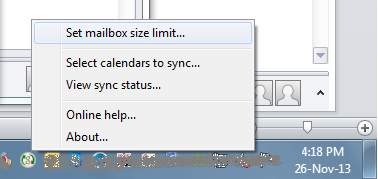
1- Go to Google Apps Sync icon in the system tray (near the date & time)
2- Right click the icon
3- Choose "Set mailbox size limit.."
4- Choose "unlimited (slowest)"